It's Just Vectors
Visualization and the embed visualize Command
· 6 min read
At some point while working with Part 2, you probably changed something (swapped a word in a description, added a category, adjusted the threshold), ran embed classify, and got a different result. You couldn’t tell whether the change helped or hurt in any principled way. The similarity scores shifted and you made a judgment call.
The classifier is doing geometry in 1536 dimensions and you have no direct access to that space. embed visualize doesn’t solve the underlying math; it just gives you a window into it, so that when the numbers change, you can see why.
What you’re building #
Here’s the output from running embed visualize against the same inputs.json used in Parts 1 and 2:
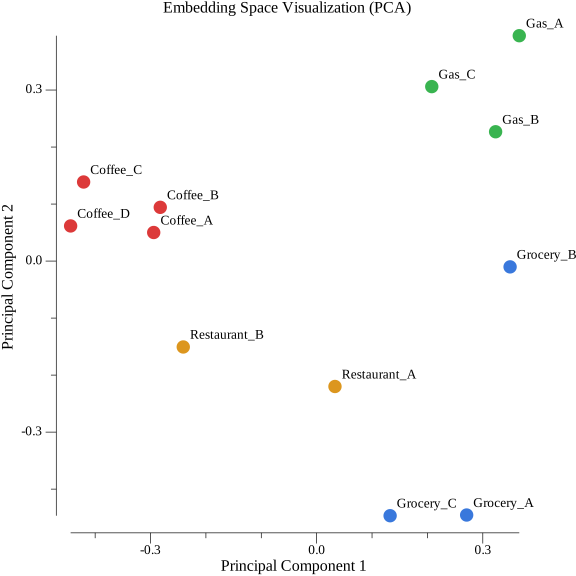
Each dot is one transaction, colored by category. A few things to notice:
- Coffee (red, left) is a tight cluster. The four training examples agree about what a coffee transaction looks like in embedding space.
- Gas (green, top-right) is similarly tight and well-separated from everything else.
- Grocery (blue, right) has two points together and one outlier. Whole Foods and Costco cluster; Safeway sits apart. More on that below.
- Restaurant (orange, centre) sits between coffee and grocery, which matches the classifier behaviour from Part 2, where restaurant queries scored second-closest to coffee.
Why PCA #
PCA — Principal Component Analysis — finds the directions in which your data varies most and projects everything onto the first two. It’s a linear compression from 1536 dimensions to 2, and it loses information. The question is whether the information it loses is the information you care about.
The axes in the plot don’t have inherent meaning. “Principal Component 1” is the direction of maximum variance in the data, computed entirely from the embedding vectors, not a label you assigned. “Principal Component 2” is the direction of second-most variance, constrained to be perpendicular to the first. What matters is the relative position of points, not their absolute coordinates or which direction is “up.”
For clustering purposes, that lost information usually doesn’t matter. Most of the variance in embedding space lives in the first few components. PCA discards the directions with the smallest variance, the ones where data points are most similar to each other. What remains in the first two components is the structure that differentiates your data most strongly, which is where cluster separation lives.
Other techniques exist. t-SNE is common for high-dimensional data and preserves local neighbourhood relationships better. PCA is the right starting point here because it’s linear, deterministic, and fast. Run it twice on the same data and you get the same plot. The Vector Math Primer covers the linear algebra.
Implementation #
The implementation has two steps: center the data, then run SVD via gonum.
PCA requires zero-mean data. Subtract the mean of each dimension across all vectors before anything else. Skipping it produces axes that describe distance from the origin rather than directions of variance. The clusters appear, but offset and distorted.
func centerMatrix(data [][]float32) [][]float64 {
    n := len(data)
    d := len(data[0])
    means := make([]float64, d)

    for _, v := range data {
        for j, val := range v {
            means[j] += float64(val)
        }
    }
    for j := range means {
        means[j] /= float64(n)
    }

    centered := make([][]float64, n)
    for i, v := range data {
        centered[i] = make([]float64, d)
        for j, val := range v {
            centered[i][j] = float64(val) - means[j]
        }
    }
    return centered
}
The SVD half is where the index ordering matters. svd.VTo returns V, a d×min(n,d) matrix. The k-th principal component is the k-th column of V — accessed as v.At(j, k), not v.At(k, j). The transposed form is always wrong for projection regardless of matrix shape; it happens to panic visibly when d > n (the typical case with 1536-dimensional embeddings), but it produces incorrect results silently when n > d.
func ProjectTo2D(data [][]float32) ([][2]float64, error) {
    centered := centerMatrix(data)
    n := len(centered)
    d := len(centered[0])

    flat := make([]float64, n*d)
    for i, row := range centered {
        copy(flat[i*d:], row)
    }

    m := mat.NewDense(n, d, flat)
    var svd mat.SVD
    if ok := svd.Factorize(m, mat.SVDThin); !ok {
        return nil, fmt.Errorf("SVD factorization failed")
    }

    var v mat.Dense
    svd.VTo(&v)

    points := make([][2]float64, n)
    for i := range points {
        for k := 0; k < 2; k++ {
            for j := 0; j < d; j++ {
                points[i][k] += centered[i][j] * v.At(j, k)
            }
        }
    }
    return points, nil
}
The query vector ordering problem #
If you run PCA on the training data and then project the query vector separately, the query will appear in the wrong place. Not slightly wrong. Meaninglessly wrong. PCA computes its axes from whatever data you give it. A vector projected using axes computed without it sits on a different coordinate system and can’t be meaningfully compared to the points around it.
The fix is to append the query vector before calling ProjectTo2D:
// Wrong: project query independently
points, _ := math.ProjectTo2D(trainingVectors)
queryPoint := projectSingle(queryVec, savedAxes) // different coordinate system

// Right: include query in the PCA input
allVectors := append(trainingVectors, queryVec)
points, _ := math.ProjectTo2D(allVectors)

queryIndex    := len(allVectors) - 1
queryPoint    := points[queryIndex]
trainingPoints := points[:queryIndex]
The axes are properties of the full dataset. The query participates in computing them.
Reading the output #
Tight clusters and outliers are both informative. Looking at the grocery cluster in the plot above: Whole Foods (“weekly grocery haul”) and Costco (“bulk household supplies”) sit close together, but Safeway (“groceries produce and dairy”) sits noticeably further away. The distance is real. It’s how the model encoded those texts. Safeway’s description is more generic and lands closer to general retail in embedding space.
The classifier still returns grocery for a Safeway query because it’s the nearest centroid. But the centroid is being pulled toward Whole Foods and Costco, which means Safeway queries score lower than they would with a more representative centroid. If that gap appears in your data, you have two options: add more varied training examples for that category, or split it.
Within-category scatter is information. A tight cluster means the training examples agree about what the category means. A loose one means they don’t, and your classifier is averaging over disagreement.
Cross-checking against the classifier is useful here: whatever embed classify separates should appear as visually distinct regions in the plot. If they overlap on the plot but the classifier separates them, something is wrong with the projection. If they cluster on the plot but the classifier confuses them, the centroid calculation is off.
Getting started #
cd tutorial/part3/
complete/ has the working implementation. start/ has centerMatrix, ProjectTo2D, and SaveEmbeddingPlot stubbed out; the command wiring is intact. Unit tests verify centering and projection against small hand-crafted vectors before anything touches the API.
export OPENAI_API_KEY="sk-your-key-here"

cd start/
go mod tidy
go build -o embed .
./embed visualize --provider openai --model text-embedding-3-small
The first time you run this and see the coffee cluster sitting apart from everything else, it’ll feel underwhelming. The classifier was already telling you that. The value is the second time, when you change something and the clusters shift, and you can see where and why instead of just watching a number move.
What’s next #
Part 4 moves from visualizing structure to detecting anomalies in it. The domain shifts to transaction fraud detection, and the central problem is one that PCA already hinted at: what you embed matters as much as how you compare it. Embedding 54.20 teaches the model a number. Embedding a sentence teaches it a transaction.
The tutorial repository and all code: rikdc/semantic-search-experiments