It's Just Vectors
Per-Category Centroids and the embed classify Command
· 4 min read
In Part 1, embed analyze computed a single centroid across all transactions and compared each one to it. Useful for understanding distribution, but not for answering “which category does this belong to?” For that you need one centroid per category, and the same math as before.
The grouping idea #
Computing the average location of every book in a large library gives you a point somewhere near the circulation desk. Technically correct. Good luck finding anything.
Compute the average location of Fiction books separately from Science separately from Reference, and you have useful addresses. A new book goes in whichever section’s centre it’s closest to.
The global centroid from Part 1 is the circulation desk problem. It represents the average of all your transactions (coffee, grocery, gas, restaurant, all mixed together) and lands somewhere between the clusters, inside none of them:

Per-category centroids each sit inside their own cluster. Each one is a reachable address.
What grouping looks like in practice #
inputs.json needs a category field alongside the usual label and text. Group the embeddings by category, then run CalculateCentroid on each group:
// Group vectors by category
categoryGroups := make(map[string][][]float32)
for i, item := range inputs {
    categoryGroups[item.Category] = append(
        categoryGroups[item.Category],
        vectors[i],
    )
}

// One centroid per category
centroids := make(map[string][]float32)
for cat, vecs := range categoryGroups {
    c, err := math.CalculateCentroid(vecs)
    if err != nil {
        return err
    }
    centroids[cat] = c
}
Four coffee entries, three grocery, three gas, two restaurant: CalculateCentroid runs once per category, four times in total. You end up with a map[string][]float32: a named address in embedding space for each category.
Embed the query and score it against each one:
queryVec, err := client.CreateEmbedding(queryText)
if err != nil {
    return err
}

var bestCategory string
var highestScore float32 = -1.0

for cat, centroidVec := range centroids {
    score, err := math.CosineSimilarity(queryVec, centroidVec)
    if err != nil {
        return err
    }
    fmt.Printf("Category: %-12s | Similarity: %.4f\n", cat, score)

    if score > highestScore {
        highestScore = score
        bestCategory = cat
    }
}

fmt.Printf("\nResult: '%s' is likely in the [%s] category.\n", queryText, bestCategory)
The query lands somewhere in the same space as all the transaction embeddings. Nearest centroid wins.
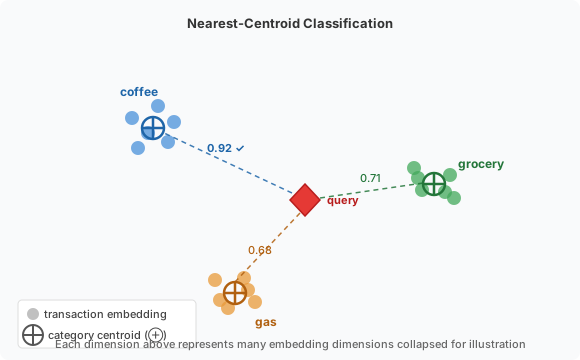
The classify command
#
Unlike analyze, this one takes the text you want to classify as a positional argument:
./embed classify --provider openai --model text-embedding-3-small "Tim Hortons coffee and donut"
inputs.json with the category field:
[
  { "label": "Coffee_A",  "category": "coffee",  "text": "Starbucks latte $5.50" },
  { "label": "Coffee_B",  "category": "coffee",  "text": "Peet's Coffee $4.25" },
  { "label": "Coffee_C",  "category": "coffee",  "text": "Blue Bottle cold brew $6.00" },
  { "label": "Grocery_A", "category": "grocery", "text": "Whole Foods $43.20" },
  { "label": "Grocery_B", "category": "grocery", "text": "Trader Joe's $31.50" },
  { "label": "Gas_A",     "category": "gas",     "text": "Shell station $62.00" },
  { "label": "Gas_B",     "category": "gas",     "text": "Chevron fuel $58.40" }
]
Expected output:
Generating embeddings for training data via openai (text-embedding-3-small)...

Classifying: 'Tim Hortons coffee and donut'

Category Similarities:
----------------------
Category: coffee      | Similarity: 0.9187
Category: restaurant  | Similarity: 0.7312
Category: grocery     | Similarity: 0.7043
Category: gas         | Similarity: 0.6821

Result: 'Tim Hortons coffee and donut' is likely in the [coffee] category.
Note: The similarity scores above are illustrative. Your exact scores will differ by model and version. The gap is what matters, not the numbers themselves.
Reading the output #
A top score of 0.92 with the runner-up at 0.70 is a clear result. A top score of 0.74 with a runner-up at 0.71 is the classifier shrugging at you.
One thing worth knowing: nearest-wins always picks a category, even when the query has nothing to do with your training data. Run ./embed classify "international wire transfer $2000" against coffee/grocery/gas data and it’ll still return something; there’s always a nearest neighbour. If that bothers you, a confidence gate handles it:
const threshold = 0.75

if highestScore < threshold {
    fmt.Printf("Result: no confident match (best score %.4f below threshold %.2f)\n",
        highestScore, threshold)
    return nil
}
Too tight and you’ll decline classifications that are genuinely fine. Too loose and you’ll classify noise. 0.75 is a reasonable starting point for well-separated categories; tune it once you have labelled examples to check against.
Getting started #
cd tutorial/part2/
Two paths. complete/ has the working implementation. start/ has the grouping logic and comparison loop stubbed out. Unit tests cover CalculateCentroid on grouped data so you can verify the math before touching the API.
export OPENAI_API_KEY="sk-your-key-here"

cd start/
go mod tidy
go build -o embed .
./embed classify --provider openai --model text-embedding-3-small "your query here"
What’s next #
Part 3 makes the geometry visible. The classifier has been working in 1536 dimensions with no way to inspect what it’s doing. PCA projects those vectors to 2D so you can see whether the clusters it separates are actually distinct.
The tutorial repository and all code: rikdc/semantic-search-experiments