It's Just Vectors
Appendix: Vector Math Primer
· 4 min read
If terms like “dot product” or “magnitude” are fuzzy, this is the right place to start. If you’re already comfortable with basic linear algebra, skip ahead to Part 1.
What Is a Vector? #
A vector is a list of numbers:
v = [1, 2, 3, 4]
In code that’s an array. In geometry it’s a point in multi-dimensional space, or an arrow from the origin to that point.
1D vector (a single number on a number line):

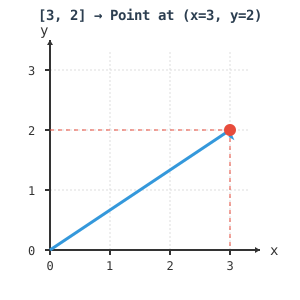
2D vector (a point in a plane):
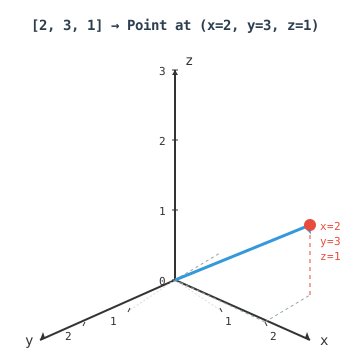
3D vector (a point in space):
1536D vector (a text embedding):
[0.123, -0.456, 0.789, ..., -0.321]
We can’t draw 1536 dimensions, but the arithmetic is identical to the 2D and 3D cases.
Key Operations #
Dot Product #
Multiply corresponding elements and sum the results:
a = [1, 2, 3]
b = [4, 5, 6]

a · b = (1×4) + (2×5) + (3×6) = 4 + 10 + 18 = 32
The result is a single number, not a vector. Geometrically it measures how aligned two vectors are: a large positive value means they point in similar directions, zero means they’re perpendicular, negative means they point away from each other.
func DotProduct(a, b []float32) float32 {
    var sum float32
    for i := range a {
        sum += a[i] * b[i]
    }
    return sum
}
Magnitude #
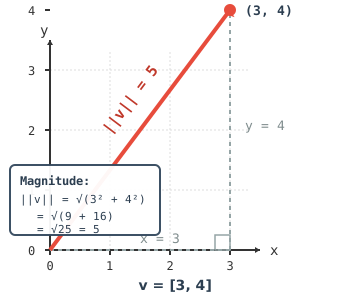
The length of a vector from the origin to its point:
v = [3, 4]

||v|| = √(3² + 4²) = √(9 + 16) = √25 = 5
func Magnitude(v []float32) float32 {
    var sum float32
    for _, val := range v {
        sum += val * val
    }
    return float32(math.Sqrt(float64(sum)))
}
Scalar Multiplication #
Multiply every element by a constant — this stretches or shrinks the vector without changing its direction:
a = [1, 2, 3]
2 × a = [2, 4, 6]   ← twice as long, same direction
Vector Addition #
Add corresponding elements:
a = [1, 2, 3]
b = [4, 5, 6]
a + b = [5, 7, 9]
Geometrically: place vectors tip-to-tail. This operation matters for Part 5 when we do query steering by adding concept vectors together.
Cosine Similarity #
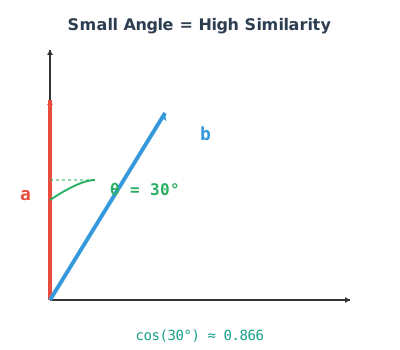
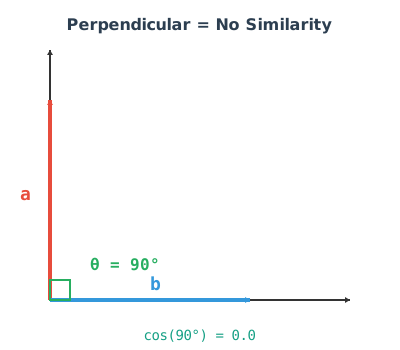
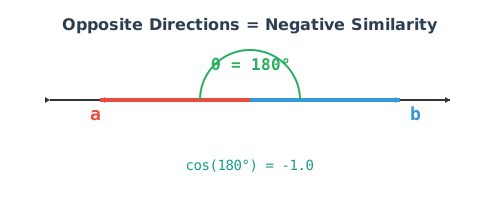
Cosine similarity measures the angle between two vectors rather than the distance between their endpoints. Two arrows pointing in the same direction score 1.0 regardless of their length. Two arrows pointing in opposite directions score -1.0. Perpendicular arrows score 0.
cosine_similarity(a, b) = (a · b) / (||a|| × ||b||)
30° apart (high similarity):
90° apart (perpendicular, no similarity):
180° apart (opposite directions):
The formula worked out on a concrete pair:
a = [1, 2, 3]
b = [2, 4, 6]   ← same direction as a, twice as long

dot product:    (1×2) + (2×4) + (3×6) = 2 + 8 + 18 = 28
magnitude of a: √(1 + 4 + 9) = √14 ≈ 3.742
magnitude of b: √(4 + 16 + 36) = √56 ≈ 7.483

similarity: 28 / (3.742 × 7.483) = 28 / 28 = 1.0
Perfect similarity, because b is just a scaled version of a.
Why cosine and not Euclidean distance? Euclidean distance measures how far apart two points are. Cosine measures how similarly they’re oriented. For semantic similarity, orientation is what matters: a short sentence and a long paragraph on the same topic should be close even though their embedding vectors are very different lengths.
Centroids #
A centroid is the average of a set of vectors — the geometric centre of the group:
centroid = (v₁ + v₂ + ... + vₙ) / n
2D example:
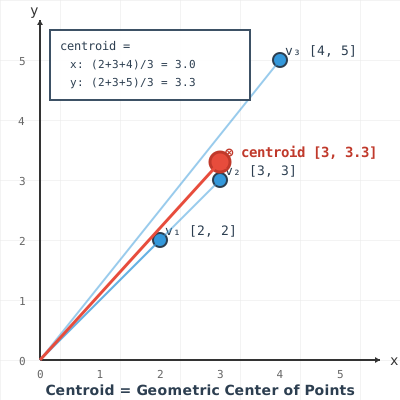
v₁ = [1, 2, 3]
v₂ = [2, 3, 4]
v₃ = [3, 4, 5]

sum:      [6, 9, 12]
centroid: [2, 3, 4]   ← the middle of the three points
In the context of embeddings, the centroid of a group of transactions represents the “typical” transaction in that group. New items can be compared to it using cosine similarity to ask how closely they resemble the group.
Quick Reference #
| Operation | Formula | Result |
|---|---|---|
| Dot product | Σ(aᵢ × bᵢ) | Scalar |
| Magnitude | √(Σ aᵢ²) | Scalar |
| Cosine similarity | (a · b) / (‖a‖ × ‖b‖) | -1.0 to 1.0 |
| Centroid | (v₁ + … + vₙ) / n | Vector |
That’s everything the series uses. The rest is just applying these operations at 1536 dimensions instead of 3.
Back to Part 1: Vectors, Cosine Similarity, and the embed analyze Command