It's Just Vectors
Vectors, Cosine Similarity, and the analyze Command
· 7 min read
The same function that tells you [8.5, 1.2, 9.2] and [8.3, 1.5, 9.0] are nearly identical also works on the 1536-dimensional vectors that an embeddings model produces for “coffee” and “espresso”. The formula doesn’t change. Only the vector length does.
This is Part 1 of a six-part series working through the mechanics of embeddings by building real Go tools. We start with the math, implement it against simple test vectors where you know the expected answer, then apply it to real text. By the end you’ll have two utility functions and a working embed analyze command. The full code is at rikdc/semantic-search-experiments.
Vectors and Cosine Similarity #
A vector is a list of numbers. [1, 2, 3] is a vector. The 1536-element array the OpenAI embeddings API returns is a vector. Each number is a coordinate in n-dimensional space, and things that are semantically similar end up in nearby regions of that space, which is the property embeddings are trained to have.
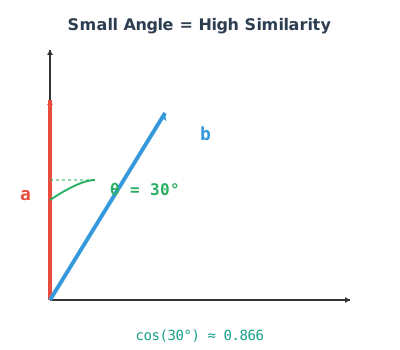
Think of each vector as an arrow pointing in space. Two arrows pointing in the same direction are similar regardless of their length. Cosine similarity measures that alignment: not how far apart the endpoints are, but how much in the same direction the arrows are pointing.
cosine_similarity(A, B) = (A · B) / (||A|| × ||B||)
Where A · B is the dot product (sum of element-wise products) and ||A|| is the magnitude (Euclidean norm). Result range:
| Score | Meaning |
|---|---|
| 1.0 | Identical direction |
| 0.9+ | Very similar |
| 0.7–0.9 | Related |
| < 0.5 | Different |
| -1.0 | Opposite directions |
Before the formula gets abstract, here it is step by step on two simple vectors:
Vector A = [3, 4]
Vector B = [6, 8]   ← same direction as A, twice as long

Step 1 – dot product:    (3×6) + (4×8) = 18 + 32 = 50
Step 2 – magnitude of A: sqrt(3² + 4²) = sqrt(25) = 5
Step 3 – magnitude of B: sqrt(6² + 8²) = sqrt(100) = 10
Step 4 – divide:         50 / (5 × 10) = 1.0
Result: 1.0. B is twice as long as A but points in the same direction, so the score is perfect. This is why cosine works for semantic similarity: a short sentence and a long paragraph on the same topic will still score close to 1.0, even though the inputs differ in length.
Implementation #
func CosineSimilarity(a, b []float32) (float32, error) {
    if len(a) != len(b) || len(a) == 0 {
        return 0, fmt.Errorf("vectors must have equal non-zero length")
    }

    var dotProduct, magA, magB float64

    for i := range a {
        dotProduct += float64(a[i]) * float64(b[i])
        magA += float64(a[i]) * float64(a[i])
        magB += float64(b[i]) * float64(b[i])
    }

    magA = math.Sqrt(magA)
    magB = math.Sqrt(magB)

    if magA == 0 || magB == 0 {
        return 0, fmt.Errorf("zero-magnitude vector")
    }

    return float32(dotProduct / (magA * magB)), nil
}
Use float64 for intermediate calculations. Accumulating float32 products introduces enough rounding error that the diagonal of your similarity matrix (a vector compared to itself should be exactly 1.0000) won’t be. That’s a confusing bug to debug later.
Testing the Math First #
Before touching any API, verify the implementation against hand-crafted vectors where the expected output is obvious:
wirelessMouse     := []float32{8.5, 1.2, 9.2} // electronics, food, computing
bluetoothKeyboard := []float32{8.3, 1.5, 9.0} // same category
organicApple      := []float32{1.0, 9.5, 0.5} // not electronics

sim1, _ := CosineSimilarity(wirelessMouse, bluetoothKeyboard) // → 0.9997
sim2, _ := CosineSimilarity(wirelessMouse, organicApple)      // → 0.2036
The two electronics items have vectors pointing in nearly the same direction, so cosine similarity is near 1. The organic apple pulls in a completely different direction, so it scores near 0. If those numbers come out right, the function is correct. Add it as a test before building anything on top of it.
Centroids #
A centroid is the centre of mass of a group of vectors: the average point in the space they occupy. Average each position across all vectors and you get it.
The concrete version. Say you have three coffee transactions run through an embeddings model:
"Starbucks coffee $4.50"       → [0.12, -0.45, 0.78, ...]
"Peet's latte"                 → [0.13, -0.44, 0.80, ...]
"Tim Hortons coffee and donut" → [0.14, -0.43, 0.82, ...]

Centroid:                        [0.13, -0.44, 0.80, ...]
That centroid represents a typical coffee purchase. To classify a new transaction, compare its cosine similarity to the centroid against a threshold — say, 0.9:
"Coffee beans from store" → similarity: 0.98   → above 0.9 ✓ coffee
"Car insurance payment"   → similarity: 0.41   → below 0.9 ✗ not coffee
The 0.9 threshold is a choice, not a given. With text-embedding-3-small, even unrelated transactions within the same domain (e.g. coffee vs gas) tend to score 0.65–0.75 because they share financial-transaction language. Genuinely different categories rarely score above 0.85, so 0.9 is a reasonable starting point for same-category classification, but you’d validate it against labelled examples in practice. That’s classification with embeddings. No training loop required.
This is a zero-shot classifier: no labelled training data, just a centroid and a threshold. It works well when categories are semantically distinct and degrades when they’re close together or the data is noisy. For anything production-grade, you’d train a proper model on top of the embedding vectors with labelled examples; logistic regression and XGBoost both work well here and give you calibrated probabilities rather than a hand-tuned cutoff. The implementation:
func CalculateCentroid(vectors [][]float32) ([]float32, error) {
    if len(vectors) == 0 {
        return nil, fmt.Errorf("empty vector slice")
    }

    dims := len(vectors[0])
    centroid := make([]float32, dims)

    for _, v := range vectors {
        if len(v) != dims {
            return nil, fmt.Errorf("inconsistent vector dimensions")
        }
        for i, val := range v {
            centroid[i] += val
        }
    }

    n := float32(len(vectors))
    for i := range centroid {
        centroid[i] /= n
    }

    return centroid, nil
}
If you have ten coffee transaction embeddings, their centroid is the “average coffee transaction.” Any new transaction can be compared to it: high similarity means it looks like the others. This is the mechanism behind classification with embeddings, and it’s what Part 2 builds on for anomaly detection. A transaction far from the centroid is unusual, but “how far” needs a statistical measure (z-score) to be meaningful rather than just “lower than the others.”
From Product Vectors to Text Embeddings #
The jump from hand-crafted vectors to text embeddings is smaller than it sounds. OpenAI’s text-embedding-3-small converts any text string into a 1536-element []float32. “Coffee” and “espresso” land near each other. “Automobile” lands somewhere else. The same CosineSimilarity function runs without modification.
The tutorial provides an embedder package in shared/embedder that wraps both OpenAI and Ollama:
client := embedder.NewOpenAIClient("text-embedding-3-small")
vec, err := client.CreateEmbedding("Coffee shop purchase")
// vec is []float32 with 1536 dimensions
To avoid API costs entirely, Ollama runs locally:
ollama pull qwen2.5:latest
export OLLAMA_HOST="http://localhost:11434"
Then use embedder.NewOllamaClient("qwen2.5:latest"). The rest of the code is identical.
The embed analyze Command
#
cmd/analyze.go connects the pieces:
- Load transactions from
inputs.json - Generate an embedding for each transaction
- Build the pairwise similarity matrix using
CosineSimilarity - Calculate the centroid of all embeddings and compare each transaction against it
./embed analyze --provider openai --model text-embedding-3-small
Expected output:
📊 Analyzing Transaction Embeddings
============================================================

Loaded 10 transactions from inputs.json

Using openai with model text-embedding-3-small

Generating embeddings...
  [1/10] Coffee_A → [0.0123, -0.0456, ...] (1536 dims)
  [2/10] Coffee_B → [0.0118, -0.0461, ...] (1536 dims)
  ...

=== Pairwise Similarity Matrix ===

                Coffee_A   Coffee_B   Grocery_A  Gas_A
Coffee_A        1.0000     0.9234     0.7123     0.6845
Coffee_B        0.9234     1.0000     0.7089     0.6798
Grocery_A       0.7123     0.7089     1.0000     0.7234
Gas_A           0.6845     0.6798     0.7234     1.0000

=== Calculating Centroid ===

Centroid calculated: [0.0134, -0.0445, ...] (1536 dims)
This represents the 'average' or 'typical' transaction

=== Similarity to Centroid ===

Coffee_A:       0.8456 (typical)
Coffee_B:       0.8234 (typical)
Grocery_A:      0.7654 (typical)
Gas_A:          0.7234 (typical)
Coffee transactions cluster together around 0.92. Cross-category comparisons drop to the 0.70 range. The diagonal is 1.0000. These are all numbers your CosineSimilarity implementation produced: 1536-element vectors, same formula.
Three things to verify before moving on: the diagonal should be exactly 1.0000; similar-category transactions should score above 0.90; different categories should fall below 0.75. If those hold, the implementation is correct.
Getting Started #
git clone https://github.com/rikdc/semantic-search-experiments
cd tutorial/part1/
Two paths from here. complete/ has the full working implementation; set your API key and run it. start/ has the same structure with the core functions stubbed out; walkthrough.md explains each step and unit tests let you verify your solution before wiring anything to the API. Your call.
export OPENAI_API_KEY="sk-your-key-here"
# or: export OLLAMA_HOST="http://localhost:11434"

cd start/
go mod tidy
go build -o embed .
./embed analyze --provider openai --model text-embedding-3-small
What’s Next #
Part 2 takes the centroid idea further: instead of one centroid for everything, one per category. That’s what makes classification work, and it’s what the embed classify command builds on.
The tutorial repository and all code: rikdc/semantic-search-experiments